
Published on September 16, 2025 · 7 mins read
Code Smarter, Not Harder: How LLMs Are Transforming Everyday Development
LLMs are changing the game — turning hours of manual coding into minutes of smart automation. At Yuvabe Studios, we see them not just as coding assistants, but as catalysts for faster innovation, cleaner code, and real business impact.
– By Mohamed Safiq S, AI/ML Developer, Yuvabe Studios
Answer Summary:
Large Language Models are transforming everyday software development by automating repetitive coding tasks, accelerating prototyping, and improving debugging workflows. By acting as intelligent coding assistants, LLMs help developers build faster, reduce errors, and deliver higher-quality software with less effort.
A New Era of Coding with Large Language Models
Not long ago, I'd spend hours debugging boilerplate code or setting up repetitive CRUD operations before I could even start solving the real problem. Today, thanks to Large Language Models (LLMs), those hours have turned into minutes. What once felt like grunt work has become a collaborative process, where I experiment, build, and innovate with ease.
And this shift isn't just personal. Across the software world, AI-powered tools like OpenAI's GPT series, Google's Gemini, and Meta's LLaMA are reshaping how developers — and the businesses they work for — approach development. Faster code means faster launches. Cleaner code means fewer bugs in production. And smarter workflows mean teams spend more time building features that matter.At Yuvabe Studios, we see LLMs as more than productivity boosters — they're enablers of creativity, faster learning, and smarter engineering.
How LLMs Improve Everyday Developer Workflows
Instead of wrestling with boilerplate code or repetitive patterns, I use LLMs to do:
1. Rapid Prototyping with LLMs
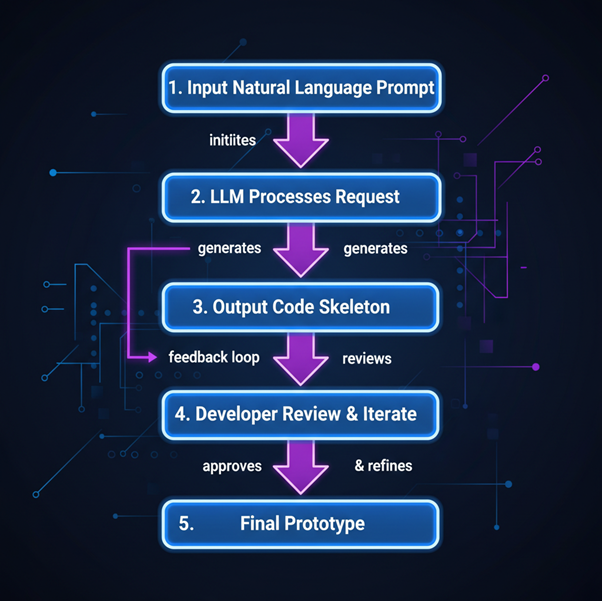
One of the most significant benefits of AI-assisted code generation is rapid prototyping. Developers can quickly spin up proofs of concept without writing every line of code manually. By providing a natural language description, an LLM can generate the skeleton of an application, including core functions, database schemas, or API endpoints. This approach allows teams to experiment with ideas faster, gather feedback, and iterate on designs more efficiently.
Example: During a recent Yuvabe prototype sprint, I used LLM-assisted code to set up an entire FastAPI backend in half a day. That speed meant we could test client feedback instantly and refine the design faster than ever before.
For businesses, this kind of speed translates directly into quicker go-to-market timelines and faster ROI on innovation.
2. Automating Repetitive Development Tasks Using LLMs
Some tasks in development feel like déjà vu — writing CRUD operations, boilerplate functions, or unit tests. This is where LLMs shine: they generate complete, ready-to-use functions in seconds — freeing you to focus on unique parts of the problem, architecture, and business logic instead of typing out patterns you’ve written a hundred times.
For businesses, fewer developer hours wasted on repetition means lower costs and higher productivity.
Example: MongoDB CRUD Functions
Prompt:
Generate CRUD functions for a MongoDB collection named "users" using Motor in FastAPI.
from motor.motor_asyncio import AsyncIOMotorClient

client = AsyncIOMotorClient(mongodb://localhost:27017)
db = client.mydatabase
users = db.users

async def create_user(user_data: dict):
    return await users.insert_one(user_data)

async def get_user(user_id: str):
    return await users.find_one({_id: user_id})

async def update_user(user_id: str, new_data: dict):
    return await users.update_one({_id: user_id},{$set: new_data})

async def delete_user(user_id: str):
    return await users.delete_one({_id: user_id})
3. GitHub Copilot and Context-Aware Code Completion
GitHub Copilot sits in your editor and predicts the next lines of code based on context, much like an autocomplete powered by LLMs. Hit Tab to accept suggestions, saving minutes of repetitive typing.
Example: Python Function Generation
I start typing:
def get_users_from_db(collection):Copilot immediately suggests:
users = []
async for user in collection.find():
 users.append(user)
return usersExample: React Component
Typing:
if (parameters.referenceImageParameterArray):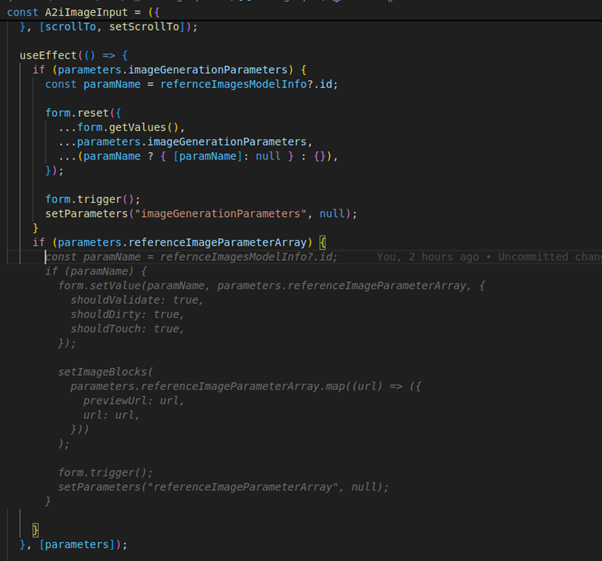
Beyond snippets, Copilot excels at multi-line edits, refactoring, and even generating docstrings. The more context I provide — through variable names or comments — the smarter its suggestions get. Whether it’s completing an async loop in Python or auto-building a React search filter component, Copilot reduces interruptions and keeps the flow intact. For developers, that means staying in the zone; for businesses, it translates into faster delivery without compromising quality.
Debugging, Learning, and Reasoning with LLMs
While building a dashboard that fetches multiple datasets, I asked an LLM to generate the useEffect logic:
LLM Generated:
useEffect(() => {
  async function fetchData() {
    const usersRes = await fetch("/api/users");
    const ordersRes = await fetch("/api/orders");
    const usersData = await usersRes.json();
    const ordersData = await ordersRes.json();
    setUsers(usersData);
    setOrders(ordersData);
  }
  fetchData();
}, [users, orders]);It looked fine, but caused issues:
- Infinite loop from state updates retriggering the effect.
- Race condition when orders loaded before users.
- Unnecessary re-renders from repeated API calls.
Fix
I debugged step by step—logging state, checking dependencies, and realizing orders must load after users. The fix was to run the effect once, fetch sequentially, and guard with an isMounted flag:
useEffect(() => {
  let isMounted = true;
  async function fetchData() {
    const usersRes = await fetch("/api/users");
    const usersData = await usersRes.json();
    if (!isMounted) return;
    setUsers(usersData);

    const ordersRes = await fetch(`/api/orders?userIds=${usersData.map(u => u.id).join(",")}`);
    const ordersData = await ordersRes.json();
    if (!isMounted) return;
    setOrders(ordersData);
  }
  fetchData();
  return () => { isMounted = false; };
}, []);Lesson Learned:
LLMs can produce valid-looking code but miss context. Logical thinking is what:
- Spots infinite loops and race conditions,
- Designs data-aware fetching,
- Prevents subtle bugs.
AI speeds coding, but reasoning ensures correctness and reliability.
Business Benefits of Using LLMs in Software Development
- Faster Time-to-Market: Launch products and features weeks sooner by using LLMs to automate prototyping, scaffolding, and repetitive coding.
- Reduced Development Costs: Cut unnecessary engineering hours — let AI handle boilerplate while your team focuses on solving unique business problems.
- Smarter Teams, Better Output: Use LLMs act as both assistants and learning tools, helping developers debug faster, learn new frameworks on the fly, and consistently deliver cleaner, more reliable code.
Final Thoughts: LLMs as Creative Development Partners

With LLMs and GitHub Copilot, my daily workflow at Yuvabe Studios has transformed. From rapid prototyping to repetitive task automation, smarter debugging, and scaffolding tests, AI helps me focus on what truly matters: creative problem-solving.
For developers, this means coding faster, learning quicker, and writing cleaner code. For businesses, it means faster product launches, reduced development costs, and happier clients.
The future of software development won’t be defined by humans or machines alone — but by the collaboration between them. At Yuvabe Studios, we believe AI doesn’t replace human ingenuity; it amplifies it, creating a new era where ideas scale at the speed of imagination.
About Yuvabe Studios
At Yuvabe Studios, our AI/ML team transforms complex ideas into purposeful innovations. From on-device AI and predictive trend engines to developer tools, virtual try-on apps, and intelligent user experiences, we bridge cutting-edge research with real-world applications.
We partner with startups, enterprises, and consumer brands to build AI solutions that are scalable, secure, and designed for growth.
Frequently Asked Questions (FAQ)
Here’s Few things you need to know about Code Generation with LLMs
LLMs, or Large Language Models, are AI systems trained on large code and text datasets that help developers generate, debug, and understand code using natural language prompts.
LLMs automate repetitive tasks like boilerplate generation, CRUD operations, and scaffolding, allowing developers to focus on logic and problem-solving.
Yes. GitHub Copilot uses large language models trained on public code to provide context-aware code suggestions directly inside the editor.
No. LLMs assist developers but do not replace human reasoning, architectural thinking, or business understanding. They amplify productivity rather than replace expertise.
Businesses benefit through faster product launches, reduced engineering costs, improved code quality, and more efficient development workflows.